Vortix Pro: Weather Radar Maps
- 4.1
- Rating
- 10.00K
- Installs
- Free
- Price
 Analysis by App-foxy
When I open a weather app, I want to understand what is happening outside without sorting through a crowded screen. Vortix Pro: Weather Radar Maps takes a focused approach: it puts live radar, storm tracking, hourly conditions, and severe-weather alerts at the center of the experience. That makes it more useful to me when I am deciding whether to leave now, postpone a walk, protect outdoor plans, or keep an eye on a developing storm.
This is a free weather app from Digital Edge Creations, rated for Everyone and available for devices running Android 8.0 or later. It has reached over ten thousand installs and holds a 4.1 average from around 174 ratings, which suggests a modest but real user base rather than a long-established weather giant. The current release is version 3.3.0, and the app first appeared on June 14, 2024.
My overall impression is that it is best understood as a radar-first weather companion, not necessarily a complete replacement for every weather service. If you like seeing rain and storm movement visually, it gives you a more immediate way to judge conditions than a simple temperature card. If you only want tomorrow’s high and low, however, a simpler forecast app may feel quicker.
You May Also Like

 Blood Strike: 2.5 Anniversary
Blood Strike’s Loadouts Turn Every Drop Into a Tactical Gamble
A close look at Blood Strike’s custom loadouts: how fast access to signature weapons reshapes its battle royale rhythm, rewards preparation, and narrows the gap between fights.

 Pandora - Music & Podcasts
Pandora’s Music Is Easy to Start, but Harder to Recover
Pandora’s strength is its low-effort path from a seed to a station. Its weak spot is how much confidence it asks you to place in connection, setup, and quiet recovery.

 8 Ball Pool
 Is Built on Rivalries, Rematches, and Routine
A close look at the rivalries, rematches, shared routines, and unanswered safety questions that turn a quick pool match into a persistent mobile community.

 Samsung Music
’s Quiet Strength Is Playing What You Already Own
Its reach comes less from spectacle than from dependable access to a personal library. That simplicity is both the app’s strongest retention engine and its ceiling.

 AccuWeather: Weather Radar
AccuWeather Review: A Quick, Clear Forecast for Everyday Decisions
For everyday plans, the best forecast is the one you can understand quickly. AccuWeather makes rain timing, radar, and local conditions easy to act on, with a few trade-offs.

 Hill Climb Racing
Why Hill Climb Racing Still Turns Crashes Into One More Run
A tiny car, a bumpy hill and one more upgrade: Hill Climb Racing keeps resurfacing because its simple chaos makes every near-miss feel personal.
More From Our News Desk
View All News


What to expect before you rely on it
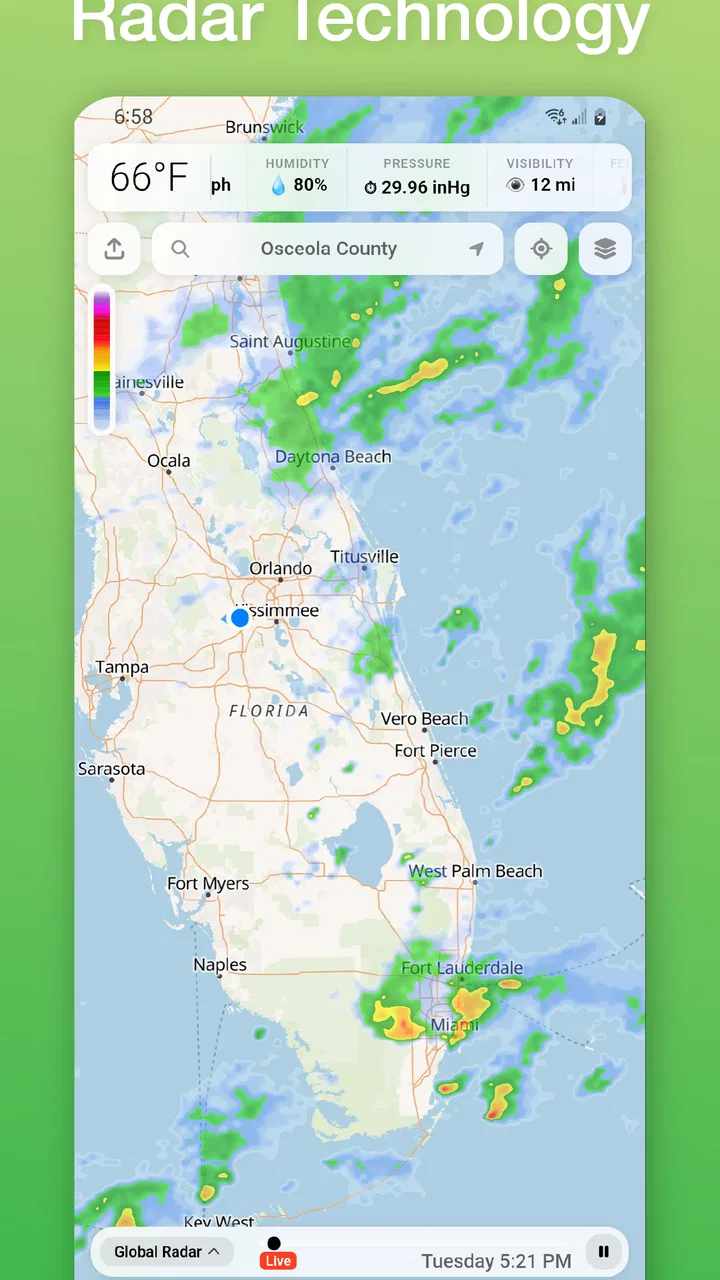
The main appeal is visual context. A conventional forecast can tell me that rain is expected, but a radar map helps me think in terms of direction, timing, and nearby movement. That difference matters when the forecast changes quickly. I can look at the map and ask a practical question: is the weather moving toward me, away from me, or passing around my area?
The app’s store summary also points to hourly forecasting and severe-weather alerts, so the experience is not limited to a map. Those features serve different decisions. The radar is useful for the next stretch of time, while an hourly forecast is more convenient when I am planning several hours ahead. Alerts are intended for situations where checking the app manually may not be enough.
I would not install it expecting a social weather network, a travel planner, or a richly personalized lifestyle dashboard. Its identity is narrower. That focus is a strength when I want storm information quickly, but it also means people who prefer a broad collection of extras may find the presentation less satisfying than a larger all-purpose weather platform.
Because the app is free to download, trying it does not require an upfront purchase. There are in-app purchases ranging from $7.99 to $39.99 per item, so I would pay attention to any upgrade screen before confirming anything. The free entry point is useful for testing the basic workflow, while the presence of paid items means I would not assume every part of the experience is included at no cost.
The audience that will get the most from it
I think it suits people who regularly make decisions around changing weather. A runner checking whether a shower is about to cross a route, a parent deciding whether to keep children at a playground, or a driver watching a line of storms before a trip can all benefit from a map-based view. It is also a sensible choice for anyone who finds a visual radar easier to interpret than a paragraph of forecast text.
The app is less compelling for someone who wants a minimal glanceable forecast and nothing else. If your normal routine is to check the temperature once in the morning, the radar may be more detail than you need. It is also not the right tool for treating an app as the sole authority during dangerous weather. Alerts are helpful, but official emergency communication should remain the priority when conditions become serious.
Getting from installation to a useful first check
I’ll focus this section on turning the first launch into a practical routine rather than trying to learn every view at once. Starting with one real question—whether conditions may affect a nearby outing, for example—gives me a clearer way to judge the radar and hourly forecast together. That small test also helps reveal where the app fits into the rest of my weather-checking habits.
Start with one simple goal
On the first launch, I recommend resisting the urge to explore every weather view immediately. Begin with one question you genuinely need answered, such as whether rain is approaching your neighborhood this afternoon. That gives the map a purpose and makes it easier to judge whether the app’s layout works for you.
Look for the current location or area view, then orient yourself before interpreting the colors or moving weather. A radar map can look impressive while still being easy to misunderstand if I do not first identify my own position. I find it helpful to zoom out just enough to see surrounding towns or larger landmarks, then zoom back in when I want a more local reading.
The first meaningful success should be small: locate your area, inspect the current radar picture, and compare it with what you can see outside. That quick reality check builds confidence. If the sky is clear where you are but a band of precipitation appears some distance away, the next useful question is not simply whether rain exists; it is whether that band is moving toward your plans.
Use the hourly view for decisions several hours away
Radar is strongest for understanding what is happening around the present moment. For a dinner reservation, commute, or outdoor appointment later in the day, I would switch to the hourly forecast rather than trying to stretch the radar into a long-range prediction. The two views answer different questions and work better together than either one used alone.
My preferred workflow is to check the hourly conditions first, identify the period that matters, and then use the radar to see whether the current pattern supports that forecast. When the two views appear to tell different stories, I treat that as a reason to keep checking rather than choosing the more convenient answer. Weather can change, and a map snapshot is not a guarantee.
This is one of the app’s more useful practical lessons: use the timeline to plan and the radar to verify the near-term situation. That approach prevents a common mistake, which is staring at a colorful map and assuming it automatically answers a question about the entire day.
Make alerts part of a backup routine
If severe-weather alerts are important to you, I would treat them as a backup layer rather than the only way you monitor conditions. The sensible routine is to check the app before an outdoor activity, leave alerts available for changing conditions, and pay attention to official instructions if a serious warning develops.
Alerts are most valuable when they reduce the need to repeatedly open the app. At the same time, notifications can become distracting if I enable them without thinking about when they are genuinely useful. I would keep them focused on the area and situations that affect me, then review the app directly when I need a more detailed view.
A realistic everyday example
Imagine I am planning a short bike ride after work. The hourly forecast suggests a reasonable window, but the sky looks unsettled when I am getting ready. I open the radar, find my location, and look for precipitation nearby. If a narrow band is moving toward my route, I can delay the ride and check again later. If the activity is clear around me and the heavier weather is moving away, I may decide to go while still keeping an eye on the alert information.
That scenario shows where this app earns its place. It does not make the decision for me, and it cannot remove uncertainty. What it does is turn a vague feeling that “the weather looks bad” into a more informed comparison between my location, the surrounding pattern, and the time I have available.
Where new users may hesitate
I’ll look at the points that can make a radar-centered app less comfortable at first: interpreting a moving map, deciding how much to rely on alerts, and weighing optional purchases against everyday use. I find it useful to separate uncertainty in the weather from uncertainty about the app itself. That distinction makes it easier to decide whether a simpler forecast view or a more authoritative source should take priority in a particular situation.
A radar map needs interpretation
The biggest adjustment is that a radar view is not the same as a guaranteed prediction. New users may see precipitation colors and assume the exact intensity or arrival time is fixed. I try to read it as a moving snapshot. Patterns can weaken, expand, split, or change direction, so the map is most useful when I revisit it before an important decision.
Another possible source of confusion is the difference between what is happening now and what the hourly forecast expects later. A quiet radar image does not automatically mean the rest of the day will stay quiet. Likewise, a passing shower on the map does not necessarily ruin every plan. Keeping those time horizons separate makes the app far easier to use.
Do not confuse more information with more certainty
Vortix Pro gives me several ways to inspect weather, but extra views do not guarantee extra accuracy in every situation. I still need to consider local conditions, the timing of updates, and the consequences of being wrong. For a casual walk, a quick look may be enough. For a long drive, outdoor work, or a safety-sensitive activity, I would check again close to departure and use official sources when warnings matter.
This is also where the app may not suit everyone. Some people prefer a single plain-language recommendation such as “bring an umbrella.” A radar-centered design asks the user to interpret movement and timing. I enjoy that control, but I understand why another person might prefer a simpler interface with less visual information.
Think carefully about paid items
The free download makes it easy to evaluate the basic experience, but the in-app purchase range means I would approach upgrades deliberately. Before paying, I would identify the exact problem I am trying to solve: more convenience, fewer interruptions, or access to a particular part of the weather experience. If the free version already handles the checks I make most often, purchasing may not add enough value for me.
That trade-off is especially important for occasional users. Someone who checks weather only before weekend plans may be satisfied without spending anything. A person who watches storms frequently and wants a more dedicated tool may consider a paid item worthwhile, but only after using the app long enough to see whether its maps and alerts fit their routine.
How it compares with ordinary weather alternatives
Compared with a basic phone weather widget, this app is more hands-on. A widget is excellent for a fast temperature glance, while Vortix Pro is better when I need to understand nearby movement. The trade-off is speed: the widget may answer a simple question immediately, but it cannot give me the same visual sense of a storm’s surrounding pattern.
Compared with a general weather app that combines forecasts, maps, news, calendars, and many customization options, this one feels more focused. That can make it easier to reach the radar information I actually want. The downside is that people who expect a broad information hub may prefer a larger service that puts more forecast formats in one place.
Compared with checking a browser or official weather source, the app offers a more convenient repeatable routine on a phone. I can use it as the first place to inspect conditions, especially when I am already preparing to leave. Still, I would not replace official warnings with a third-party app when safety is involved. The best setup for me is layered: use this app for visual context and quick planning, then confirm serious warnings through authoritative channels.
Its strongest distinction is not that it eliminates the need for other weather information. It is that it encourages a different question. Instead of asking only “What is the forecast?”, I can ask “What is moving near me, and how might that affect the next decision?” That is a meaningful advantage for active users.
Practical habits that make the app more useful
First, check the map at two different moments when timing matters. A single glance can show where precipitation is, but a later glance gives me a better sense of movement. This is more informative than trying to estimate direction from one still image.
Second, compare the map with the hourly forecast instead of choosing one and ignoring the other. If I am planning an event several hours away, the hourly view gives me the broader schedule, while the radar helps me judge whether current conditions are changing in a way that deserves caution.
Third, avoid making a decision from a zoom level that hides the surrounding area. A very close view may make local conditions easy to see but can conceal a larger band approaching from outside the frame. I prefer to begin wider, understand the pattern, and then zoom in for the final local check.
Fourth, use alerts to prompt attention, not to replace judgment. An alert can tell me that conditions deserve a closer look, but I still need to consider where I am going, how long I will be outside, and whether postponing is sensible. This habit keeps the app helpful without turning it into a false guarantee.
Finally, decide whether the app is earning a permanent place on your phone based on your actual routine. If you repeatedly use the radar before commuting, exercising, traveling locally, or managing outdoor plans, its focused design may be valuable. If you open it only for a temperature number, a lighter alternative may be more efficient.
My recommendation after using the full workflow
I would recommend Vortix Pro to a first-time weather-app user who wants more than a static forecast but does not need a sprawling weather dashboard. The path to value is reassuringly straightforward: install it, find your area, inspect the radar, use the hourly view for later plans, and keep alerts as an additional warning layer. That sequence gives you a meaningful result without requiring advanced weather knowledge.
My recommendation is more qualified for people who dislike interpreting maps or who want every detail presented as a simple sentence. The app’s focus is also less useful if you never plan around changing conditions. In those cases, a phone widget or simpler forecast tool may be the better choice.
For me, the deciding strength is the way the app connects a visual weather pattern with an ordinary decision. It is not just about watching a storm animation; it is about deciding whether to leave, wait, change a route, or check again. The limitations are equally clear: radar requires judgment, forecasts can change, and paid items should be considered rather than assumed.
With its free starting point, Everyone rating, support for Android 8.0 and later, and a current version of 3.3.0, it is accessible to many Android users who want to try a radar-focused approach. Digital Edge Creations has built something more purposeful than a basic temperature display, even if it will not be the ideal weather tool for every style of user.
My final view is that Vortix Pro is worth trying when your weather decisions depend on what is moving nearby, not just on the number shown for today’s temperature. Start with the free experience, test it during a real planning situation, and judge it by whether the radar and hourly views help you act with more confidence. If they do, the app has a practical role; if they do not, a simpler alternative will probably serve you better.
FAQs for Vortix Pro: Weather Radar Maps
01What features does Vortix Pro: Weather Radar Maps offer?
Vortix Pro provides users with high-resolution radar maps, real-time weather updates, storm tracking, and detailed forecasts. It also includes customizable alerts for severe weather conditions and a user-friendly interface to help you navigate through various weather data efficiently. The app is designed to keep you informed about the latest weather developments in your area.
02Is Vortix Pro suitable for professional use?
Yes, Vortix Pro is designed for both casual users and professionals in need of detailed weather data. Its advanced radar capabilities and accurate storm tracking make it ideal for meteorologists, emergency responders, and outdoor enthusiasts who require precise weather information for planning and safety purposes.
03How accurate is the weather data provided by Vortix Pro?
Vortix Pro sources its data from reliable meteorological agencies, ensuring high accuracy and reliability. While no weather app can guarantee 100% accuracy due to the dynamic nature of weather, Vortix Pro uses advanced algorithms and real-time updates to provide some of the most precise forecasts and radar maps available.
04Does Vortix Pro offer customizable alerts?
Yes, Vortix Pro allows users to set up customizable alerts based on their specific needs. You can choose to receive notifications for severe weather, such as thunderstorms, tornadoes, or heavy rainfall, ensuring you are always prepared and informed about potential weather threats in your area.
05Is Vortix Pro available on both Android and iOS platforms?
Vortix Pro is available for download on both Android and iOS devices. Users can access the app through the Google Play Store for Android devices and the Apple App Store for iOS devices. This cross-platform availability ensures that you can access high-quality weather data regardless of your preferred device.
Pros
- Highly accurate real-time weather updates.
- Detailed radar maps with various layers.
- User-friendly interface with intuitive navigation.
- Customizable alerts for severe weather conditions.
- Offline mode for accessing forecast data.
Cons
- In-app ads can be intrusive at times.
- Some features require a premium subscription.
- Occasional delays in radar updates.
- High battery consumption during use.
- Limited language options available.

Vortix Pro: Weather Radar Maps
Gallery